MQTT
You'll need to have a working MQTT broker to use MQTT. HiveMQ has some great MQTT essentials articles if you'd like to know more about MQTT.
Newer Smart Hut Tasmota firmware
Newer plugs use a simplified Tasmota interface with a main-menu MQTT button. See Tasmota V2 MQTT if your plug has the newer interface.
Configuring MQTT using the WebUI
Go to Configuration -> Configure Other and make sure "MQTT Enable" box is checked. Once MQTT is enabled you need to set it up using Configuration -> Configure MQTT.
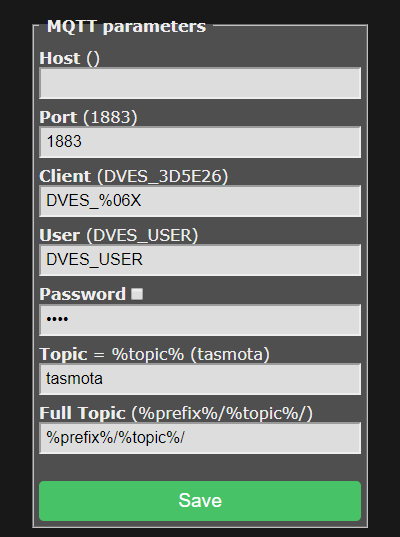
For a basic setup you only need to set Host, User and Password but it is recommended to change Topic to avoid issues. Each device should have a unique Topic.
- Host = your MQTT broker address or IP (mDNS is not available in the official Tasmota builds, means no
.localdomain!) - Port = your MQTT broker port (default port is set to 1883)
- Client = device's unique identifier. In 99% of cases it's okay to leave it as is, however some Cloud-based MQTT brokers require a ClientID connected to your account. Can not be identical to Topic!
- User = username for authenticating on your MQTT broker
- Password = password for authenticating on your MQTT broker
- Topic = unique identifying topic for your device (e.g. hallswitch, kitchen-light).
%topic%in wiki references to this. It is recommended to use a single word for the topic. - FullTopic = full topic definition. Modify it if you want to use multi-level topics for your devices, for example
lights/%prefix%/%topic%/or%prefix%/top_floor/bathroom/%topic%/etc.