ESPHome
The ESPHome Smart Hut plug firmware is designed to work with Home Assistant and exposes the relay, power monitoring, automation helpers, diagnostics, and configuration controls as Home Assistant entities.
Firmware source: Smart-Hut/Smart-Plug
What You Need
- Your 2.4 GHz Wi-Fi network name and password
- A phone, tablet, or laptop to complete Wi-Fi setup
- Home Assistant with the ESPHome integration
ESPHome is intended to be used with Home Assistant. If the plug is not connected to Home Assistant, ESPHome devices can restart periodically while they try to reconnect to the native API.
First Power On
Plug in your smart plug and wait for the power LED to start flashing. This means the plug is in setup mode and is ready to connect to Wi-Fi.
The plug will create a temporary Wi-Fi network named Smart hut Plug if it cannot connect to a saved Wi-Fi network.
Connect To Wi-Fi
Using your phone, tablet, or laptop, connect to the temporary Smart hut Plug Wi-Fi network.
You should then be shown the setup page.
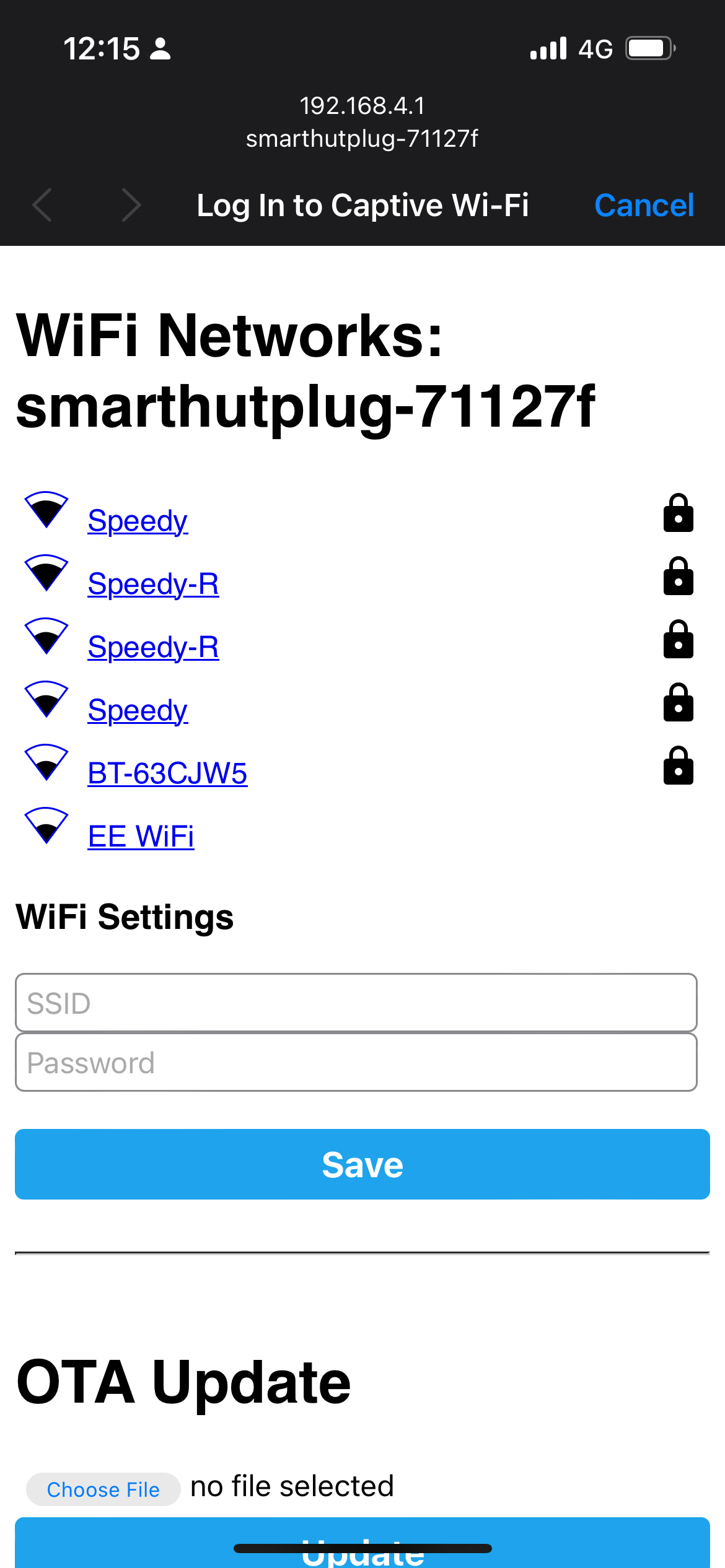
If the setup page does not open automatically, open a browser and go to http://192.168.4.1.
Select your Wi-Fi network and enter your Wi-Fi password. After saving, your device will disconnect from the temporary Wi-Fi network and the plug will connect to your home network.
Add The Plug To Home Assistant
Once the plug is on your Wi-Fi network, Home Assistant should discover it automatically through the ESPHome integration. You can add it from Settings > Devices & services, either from the discovered device notification or from the ESPHome integration.
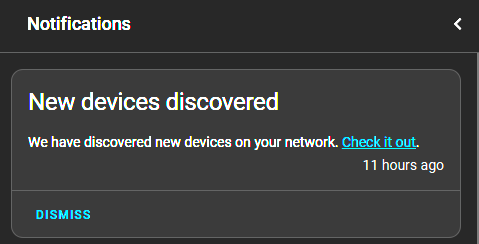
Select the plug and add it.

Submit the configuration shown in the dialog.
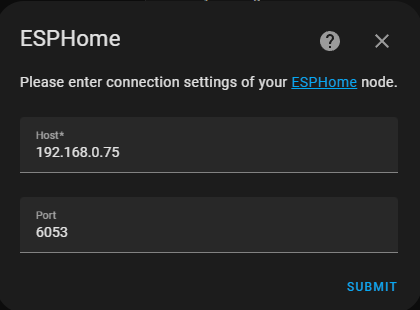
Your device should now appear in Home Assistant with the relay switch, sensors, buttons, and configuration entities.
What To Configure First
After setup, review these settings in Home Assistant:
- Power loss behaviour: choose what the plug does after a power cut or reboot.
- LED Behaviour: choose whether the LED follows relay state, stays off, or stays on.
- Electricity Rate: set your energy price in
GBP/kWhif you want cost estimates. - Local Button Lock: enable this if the physical button may be pressed accidentally.
Feature Guides
Detailed guides are available for the ESPHome firmware features, including suggested settings and potential use cases.
- Relay, button, LED, and power restore
- Power monitoring and cost tracking
- Auto-off and standby killer
- Appliance detection
- Detection helpers and Home Assistant automations
- Calibration, diagnostics, and maintenance
Common Use Cases
- Use auto-off for chargers, heaters, fans, lamps, and temporary equipment.
- Use standby killer for TVs, media systems, speakers, and chargers that drop to low standby power.
- Use appliance detection for washing machines, tumble dryers, dishwashers, and dehumidifiers.
- Use power monitoring and cost tracking to understand daily and lifetime energy usage.
- Use local button lock for appliances that should not be switched off accidentally.
Custom Firmware Source
Advanced users can review or import the full ESPHome YAML from the firmware repository:
github://Smart-Hut/Smart-Plug/ESPC2-02.yaml@v2.1.0
Source file: ESPC2-02.yaml
The firmware uses an ESP32-C3, a BL0937-compatible power monitoring chip, a relay, an LED, and a local button. The shipped configuration should be used unless you know you need to maintain a custom ESPHome build.